Ovia Cycle & Pregnancy Tracker
- 4.5
- Rating
- 1.00M
- Installs
- Free
- Price

 Analysis by App-foxy
I approached Ovia Cycle & Pregnancy Tracker as a health companion rather than a simple calendar. It is a free medical app from Ovia Health that brings cycle tracking, ovulation, fertility, pregnancy, postpartum, menopause, and broader women’s health into one place. That wide scope is its main appeal: instead of switching between separate tools as life changes, I can keep one health record and adapt what I track.
My overall impression is positive, especially for someone who wants a guided way to notice patterns without paying for a specialist fertility app. The experience is more useful when I treat it as an organized journal and educational aid, not as a diagnostic service. Its audience is broad, but that also means some screens and explanations may feel less focused than a purpose-built period calendar or pregnancy-only tracker.
How the app handles readability, navigation, and changing health contexts
I find readability and navigation matter especially in a health app whose focus can shift as life changes. In this section, I look at how to keep the experience manageable and how to choose a useful starting point for the situation I’m in, rather than trying to explore every topic at once. That practical approach also helps frame the tradeoffs of a broad health companion.
You May Also Like

 Pandora - Music & Podcasts
Pandora’s Music Is Easy to Start, but Harder to Recover
Pandora’s strength is its low-effort path from a seed to a station. Its weak spot is how much confidence it asks you to place in connection, setup, and quiet recovery.

 8 Ball Pool
 Is Built on Rivalries, Rematches, and Routine
A close look at the rivalries, rematches, shared routines, and unanswered safety questions that turn a quick pool match into a persistent mobile community.

 Samsung Music
’s Quiet Strength Is Playing What You Already Own
Its reach comes less from spectacle than from dependable access to a personal library. That simplicity is both the app’s strongest retention engine and its ceiling.

 AccuWeather: Weather Radar
AccuWeather Review: A Quick, Clear Forecast for Everyday Decisions
For everyday plans, the best forecast is the one you can understand quickly. AccuWeather makes rain timing, radar, and local conditions easy to act on, with a few trade-offs.

 Hill Climb Racing
Why Hill Climb Racing Still Turns Crashes Into One More Run
A tiny car, a bumpy hill and one more upgrade: Hill Climb Racing keeps resurfacing because its simple chaos makes every near-miss feel personal.

 AliExpress - Shopping App
AliExpress Makes Global Shopping Feel Personal, but Shoppers Bear the Risk
AliExpress turns a global marketplace into a pocket-sized discovery engine. Its reach is useful, its shopping loop compelling, and its trade-offs easy to miss.
More From Our News Desk
View All News


A broad starting point that needs a little patience
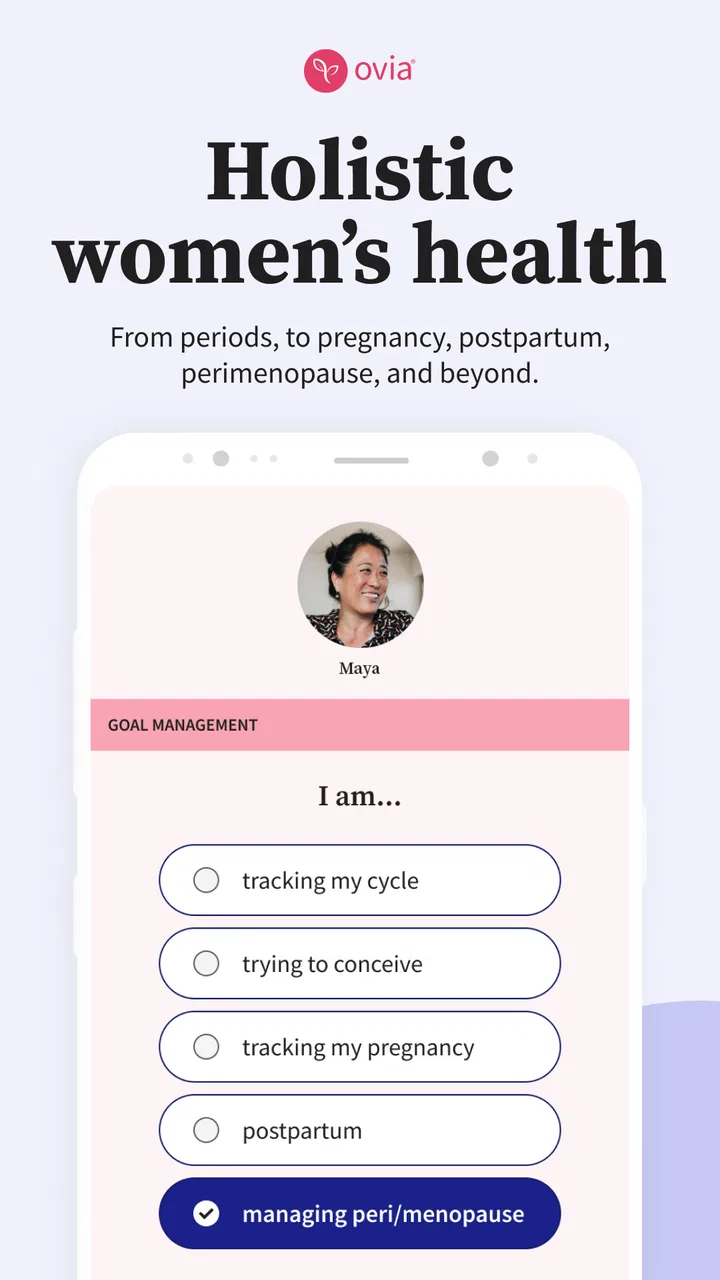
The first thing I noticed is that Ovia Cycle & Pregnancy Tracker is trying to support several stages of reproductive health at once. That can be reassuring if my needs are changing, but it also creates a denser experience than an app dedicated only to periods. I have to pay attention to the selected health context so that the information I see matches what I am actually trying to understand.
The store short description calls it Ovia Cycle, while its wider purpose reaches well beyond cycle dates. I would therefore recommend taking a moment during setup to make the app reflect the situation I am in now. A person monitoring regular cycles, someone trying to conceive, and someone recovering after birth should not expect the same emphasis from the interface.
Navigation is easiest when I use the app in short, repeatable visits. Rather than exploring every section at once, I would check the daily view, record only the symptoms that matter to me, and return later for trends or educational material. This reduces visual and mental clutter and makes the app feel more like a routine than a large medical dashboard.
Readable information is most helpful when I separate facts from interpretation
Health apps can make predictions look more certain than they really are. I found it important to read fertile-window and cycle guidance as estimates built from the information I enter. A late period, irregular cycle, illness, stress, medication change, or postpartum transition can make historical patterns less useful. Ovia can help me organize observations, but it cannot turn incomplete entries into certainty.
That distinction is particularly important for people with irregular cycles. A clean calendar may look reassuring even when the underlying pattern is complicated. I would use the app to record bleeding, symptoms, and relevant changes, then discuss persistent concerns with a qualified clinician rather than treating an app prediction as medical advice.
The educational side is valuable for readers who want plain-language context before making an appointment. Still, readability is not only about short sentences or attractive screens. It is also about whether the app makes clear what is user-entered information, what is an estimate, and what requires professional attention. I found that I need to keep that mental separation myself.
Useful customization without turning tracking into homework
One of the more practical ways to use the app is to choose a small set of observations that genuinely affect my decisions. For example, I might record bleeding, pain, mood, sleep, or cervical changes when those details help me recognize a pattern. Logging everything every day sounds thorough, but it can make the routine tiring and encourage me to abandon it.
A better workflow is to begin with the minimum information needed for my goal, then add another detail only when it answers a real question. Someone preparing for a medical appointment could keep entries focused on timing and symptoms. Someone trying to understand fertility patterns might need a different group of observations. This selective approach makes the app more accessible to people who find extensive forms exhausting.
Motor and sensory considerations in everyday use
Cycle tracking is often performed while distracted: in bed, on a commute, in a bathroom break, or while caring for a child. That context matters. A useful health app should not require a long, perfectly focused session every time I want to record a symptom. Ovia works best when I keep entries brief and use it as a quick check-in rather than a detailed diary at every opening.
For people with limited dexterity, repeated tapping can become a real barrier even when each individual control seems simple. I would suggest deciding in advance which entries are essential and avoiding unnecessary daily logging. If a person finds the interface tiring, a separate paper note or a simpler calendar may be a better temporary capture method, with the app used later for organized review.
Sensory needs also vary. A screen with several categories, health terms, and changing content can be harder to process for someone who is sensitive to visual density or who has difficulty concentrating. I would use the phone’s own display and text settings where available, keep the app visits task-based, and avoid trying to read every educational item in one sitting. Those steps do not change the app itself, but they can make the experience less demanding.
People with vision, hearing, cognitive, or motor disabilities should judge the actual controls on their device rather than assuming that a medical label guarantees accessibility. The app is rated for Everyone, which makes it approachable in audience terms, but that age classification is not the same as a promise that every interaction will suit every ability. I would test the main tasks first: opening the relevant view, entering a symptom, correcting an entry, and finding past information.
Situational access: where the app fits and where it does not
Ovia is particularly useful when my health information is scattered across memory, notes, and changing routines. A realistic example is returning to work after having a baby. Sleep may be irregular, symptoms may be easy to forget, and appointments may be separated by weeks. A quick record in the app can help me recall what happened before speaking with a clinician, provided I do not expect the app to interpret postpartum symptoms on its own.
It can also help someone preparing for a fertility consultation. Instead of trying to remember the dates of bleeding or the pattern of symptoms, I can build a timeline to discuss. The value here is not that the app replaces testing or clinical judgment. The value is that it gives me a clearer starting point for a conversation and may help me notice which questions I want to ask.
For menopause, the broader scope is convenient because I do not have to abandon the same general health tool when my tracking needs change. However, a person seeking highly specialized menopause management may prefer a service centered entirely on that transition. Ovia’s advantage is continuity; a specialist alternative may offer a narrower, more focused experience.
Privacy and comfort are also part of situational access. I may want to record sensitive information in a shared household, at work, or while traveling. I would avoid entering details in a public setting if that makes me uncomfortable, and I would review the phone’s own lock and notification settings before relying on any health app. The practical lesson is simple: the easiest app to access is not always the safest place to discuss personal information aloud or on a visible screen.
Where it compares well with ordinary alternatives
The usual alternative is a basic calendar, a notes app, or a reminder. Those tools can be faster for recording a date, and they may feel less intrusive because they do not present health-focused guidance. Ovia’s advantage is organization: it connects cycle, fertility, pregnancy, postpartum, menopause, and women’s health topics in one dedicated setting. That gives me more context than a blank calendar.
On the other hand, a simple calendar can be better for someone who wants only period dates and nothing else. It has less to learn, fewer categories to consider, and no temptation to interpret a prediction as a conclusion. I would choose the simpler option for a person who dislikes health content, rarely needs trend information, or wants the smallest possible daily task.
Compared with a pregnancy-only tracker, Ovia is more flexible before and after pregnancy. Compared with a fertility-focused tool, it may feel less specialized for someone who wants a highly concentrated conception workflow. Its strength is the ability to move between life stages; its trade-off is that no single stage receives the entire design focus.
Remaining barriers that affect trust and inclusion
The biggest barrier is not the price. The app is free, which makes trying it less risky for people who cannot justify another subscription. The harder question is whether the amount of information feels manageable. A person dealing with pain, anxiety, fatigue, irregular cycles, or major life changes may not want another system that asks for consistent attention.
Another limitation is the danger of false precision. Predictions can be useful for planning, but they are not equally reliable for everyone. If my cycle changes frequently, I would treat the calendar as a record of the past and a rough planning aid, not as a dependable schedule. Anyone using it to avoid pregnancy should be especially cautious about relying on predictions alone.
The app also should not become a substitute for urgent care. Severe pain, unusual bleeding, pregnancy concerns, or symptoms that feel alarming deserve appropriate medical attention. Logging them may help me remember details, but waiting for an app insight would be the wrong use of the tool.
There is also a learning curve created by the app’s breadth. A first-time user may wonder which sections matter and which can be ignored. My advice is to choose one purpose for the first week: cycle history, fertility observations, pregnancy preparation, postpartum notes, or menopause symptoms. Once that routine feels comfortable, I can decide whether the other areas add value.
Version 8.8.0 is the current version, and the app requires operating system version 10 or later. That requirement is worth checking before installation, particularly for someone using an older phone or a device kept for accessibility reasons. A technically incompatible app is not useful no matter how well its content fits the user.
Who will get the most from it
I would recommend Ovia to someone who wants one free place to track changing reproductive-health needs and who is willing to spend a little time learning the layout. It suits people who appreciate reminders, educational context, and a record they can review before an appointment. It is also a sensible option for someone who expects their needs to change over time and does not want to start over with a new app at every stage.
I would be more cautious recommending it to someone who wants a bare-bones period calendar, someone who finds prediction-based health tools stressful, or someone who needs a highly specialized clinical program. It may also be a poor fit if daily tracking feels like an obligation. In that case, a simpler calendar or notes workflow can preserve the useful record without adding extra decisions.
The app has a 4.5 average from around 82 thousand ratings, and it has passed one million installs. Those figures suggest that many people find the approach worthwhile, but they do not tell me whether its navigation or tracking style will suit my particular ability, cycle, or health goal. I would use its popularity as a reason to try it, not as proof that it is universally comfortable.
My inclusive verdict after using it as a health companion
Ovia Cycle & Pregnancy Tracker is strongest when I use it as a flexible health journal with helpful context around the entries. It brings several stages of women’s health into one free medical app, and that continuity can be genuinely valuable. I especially like the idea of keeping a practical history for appointments instead of depending on memory during a stressful conversation.
Its inclusive value is more conditional. The broad subject range can support different situations, but it can also create cognitive load. Motor and sensory accessibility should be judged through the actual daily tasks on my device, not assumed from the app’s category or age rating. People with irregular cycles, urgent symptoms, or a need for specialist guidance should keep its predictions in perspective.
After testing the likely workflows, I would keep it if I wanted a single record covering cycles, fertility, pregnancy, postpartum changes, menopause, and related health observations. I would skip it in favor of a simpler or more specialized alternative if my needs were narrow. The best way to use Ovia is selectively: record what matters, question every prediction, and bring meaningful patterns to a healthcare professional.
That balance is what makes the app worth recommending to a friend. It is not a replacement for care, and it is not equally effortless for every user, but it can turn scattered observations into something easier to understand and discuss. For people who value that kind of continuity, Ovia Health has created a practical starting point rather than just another date-marking calendar.
FAQs for Ovia Cycle & Pregnancy Tracker
01What is Ovia Cycle & Pregnancy Tracker used for?
Ovia Cycle & Pregnancy Tracker is a reproductive health app designed to help users monitor menstrual cycles, ovulation, fertile windows, symptoms, moods, and related health information. It also offers pregnancy tracking features for users who are expecting. Based on the information entered, the app provides estimates and educational content, but these predictions should not be treated as guaranteed medical advice or a substitute for professional care.
02How accurate are Ovia’s period and ovulation predictions?
The app’s predictions can be useful for identifying general patterns, but their accuracy depends heavily on the consistency and completeness of the information you provide. Cycle length, stress, illness, medication, hormonal changes, and irregular periods may affect results. Ovia should not be relied on as a contraceptive method or for diagnosing fertility problems. Users with concerns about conception or irregular cycles should consult a qualified healthcare professional.
03Can Ovia be used during pregnancy?
Yes. Ovia includes pregnancy-related tracking tools that can help users follow pregnancy progress, record symptoms, prepare questions for appointments, and access educational information about fetal development and common changes. However, the app does not replace prenatal care, examinations, or advice from an obstetrician or midwife. Any severe, unusual, or worrying symptom should be discussed promptly with a medical professional.
04Is my health and reproductive data private in Ovia?
Because Ovia handles sensitive information such as periods, fertility, symptoms, pregnancy details, and possibly lifestyle data, users should review its current privacy policy and app permissions before creating an account. Privacy practices can change over time and may vary by region or account type. Avoid entering information you are uncomfortable sharing, and check available settings for data controls, notifications, and account deletion.
05Is Ovia Cycle & Pregnancy Tracker free to download?
Ovia is generally available as a free download, although some versions, programs, or features may depend on location, employer or health-plan access, and current in-app offerings. The app may also include optional premium services or sponsored health programs. Before downloading or subscribing, review the store listing, purchase terms, and renewal conditions so you understand which tools are free and whether any charges may apply.
Pros
- Tracks cycles
- symptoms
- moods
- and fertility signs in one place.
- Pregnancy mode offers weekly updates and helpful health information.
- Custom reminders can support medication
- appointments
- and cycle planning.
- Clear charts make personal patterns easier to review over time.
- Includes educational content for conception
- pregnancy
- and reproductive health.
Cons
- Some advanced insights and features may require a paid subscription.
- Predictions can be less accurate with irregular or changing cycles.
- Requires consistent data entry for the most useful tracking results.
- Health content may feel overwhelming for users seeking a simple calendar.
- Privacy settings should be reviewed carefully before entering sensitive information.

Ovia Cycle & Pregnancy Tracker
Gallery